



🎮 Box Press Puzzle
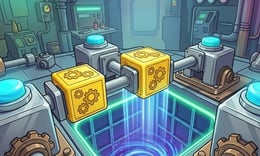
⭐ Crazy3D Editor's Pick: Box Press Puzzle makes a small group of pistons feel like a complete logic machine. The goal is direct—send every cyan cube to the central drop zone—but the order of your clicks matters because a pushed cube can remove the space needed for the next move. It is a quiet, diagram-like puzzle for players who enjoy planning before committing.
🔎 What Is Box Press Puzzle?
Box Press Puzzle is a mechanical logic game published on GameMonetize by AlexGames. Each layout places colored cubes, pistons, barriers, and a central drop zone on a compact board. The publisher describes the task as activating pistons in the perfect sequence, pushing the smooth cubes into the center without blocking a route.
This is not a conventional match game or a reflex test. A click is a commitment: a piston can move a cube, occupy a useful lane, or close the angle needed for another push. The layouts become more complex as you progress, so the main skill is reading the board as a set of dependencies. The current publisher listing labels it Arcade and Puzzle, gives a 350 × 600 game frame, and lists mouse clicking as the instruction. The listing also marks the game as not mobile-ready, so treat the embedded browser version as desktop-first.
🕹️ Core Gameplay: Five Steps of a Puzzle
- Scan the whole board before clicking. Identify every cyan cube, each piston direction, the central drop zone, and any narrow lane that could be used only once.
- Trace the final push for one cube. Decide which side must stay open and which piston can move it toward the center without sealing another route.
- Activate a piston with a deliberate mouse click. Watch the cube’s new position rather than immediately clicking the next mechanism.
- Re-read the remaining layout after every push. If a cube now blocks a corridor, change the planned order before spending another move on the wrong side.
- Finish by sending the remaining cubes into the drop zone. A solved layout is the result of a complete sequence, not simply of moving one cube close to the goal.
There is no evidence on the publisher page of a timer, combat, multiplayer mode, or inventory system. The pressure comes from spatial irreversibility: a correct-looking first move can still create an unsolvable board. If the hosted canvas shows a reset or level control, use that control to test a new order rather than refreshing the browser repeatedly.
🎯 Controls
| Action | Mouse or keyboard |
|---|---|
| Activate a piston | Left mouse click |
| Select a visible board element | Left mouse click |
| Reset or advance | Use the visible in-game button, if shown |
| Pause / sound | Use the visible in-game menu, if shown |
The publisher lists only “Mouse to click.” It does not document keyboard shortcuts, drag gestures, or a touch layout, and the page marks the game Mobile Ready: No. Do not infer WASD, arrow keys, or swipe controls. The Crazy3D iframe may show a preloader or a different button arrangement; follow its own prompt if it exposes one.
🏆 Modes and Progression
- Sequence-based layouts: the central challenge is choosing a legal piston order for each spatial arrangement.
- Increasing complexity: the publisher says the spatial layouts grow harder, so later boards demand more dependency planning.
- Single-player logic: the listing presents a mouse-driven puzzle with no multiplayer or competitive mode advertised.
- Completion by placement: the visible objective is to push the colored cubes into the central drop zone, not to collect a score through repeated taps.
The progression is therefore about solving new arrangements, not upgrading an avatar. Keep your attention on which spaces remain available after each push. If a later layout looks crowded, begin at the goal and work backward: the cube that must enter last often determines which lane cannot be closed early.
✨ Key Features
🔹 Pistons as one-way decisions
Each piston is more than a button. It changes the board’s geometry by pushing a cube, so the correct choice depends on direction and timing. This gives the game a compact planning problem even when the controls remain a single click.
🔹 A central drop-zone objective
The colored cubes have a clear destination in the middle of the layout. Working backward from that drop zone makes the objective readable, while the surrounding pistons create the ordering puzzle.
🔹 No-reflex mechanical pacing
The publisher describes a logic puzzle rather than a timed action game. You can inspect a layout, form a sequence, and click carefully; the challenge is avoiding a blocked pathway, not reacting to an enemy.
🔹 Compact vertical browser frame
GameMonetize lists a 350 × 600 frame, making this a narrow, board-focused HTML5 experience. On desktop, give the canvas enough height and keep browser zoom at its default so piston and cube positions stay easy to compare.
🧠 Practical Tips
- Mark the cube that has the fewest possible approaches to the center. Solve its lane first, but do not close the lane before every prerequisite push is complete.
- Count open spaces after each click. If a move leaves a cube touching a barrier with no useful side exposed, undo or reset immediately if the build provides that option.
- Plan from the drop zone backward. The last cube often tells you which piston must remain unused until the end.
- Treat every piston click as a testable hypothesis. Pause to inspect the new board state instead of relying on the sequence you imagined before the move.
- Use a mouse with a steady pointer and enlarge the game area rather than guessing from a cropped view. The source listing does not promise mobile controls.
📱 Desktop and Mobile Experience
Desktop is the recommended device because the publisher lists mouse clicking and explicitly marks the game as not mobile-ready. A laptop or desktop browser gives you a stable view of the vertical 350 × 600 frame and makes precise piston selection easier. The hosted page may still appear inside a phone browser, but that is not evidence of touch support; do not expect tap targets or swipe gestures unless the canvas displays them. Use fullscreen only if the in-game wrapper offers it, keep the browser at 100% zoom, and follow any current start or reset prompt from the loaded build.
❓ Frequently Asked Questions
Is Box Press Puzzle free? The GameMonetize page presents a free browser game and supplies a direct HTML5 link. Crazy3D hosts that browser candidate without requiring an app download, subject to the embedded player and network availability.
What is the objective? Activate pistons in a workable order so that every cyan cube reaches the central drop zone without blocking the pathways needed by the remaining cubes.
Can I play it with a phone or keyboard? The publisher lists mouse clicking and marks the game Mobile Ready: No. Keyboard shortcuts and touch controls are not documented, so use the current in-game prompt rather than assuming them.
🔗 Crazy3D Recommendations
- Screw Master Pin Puzzle
- Wake Up the Box
- Craft Magic World Escape
- Browse New Games
- Explore the Crazy3D 3D collection


