


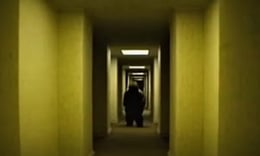


🎮 Backrooms
⭐ Crazy3D Editor's Pick: Backrooms immerses players in a chilling horror experience where they navigate through endless, empty rooms filled with fluorescent lights. Inspired by a Creepypasta story, players must survive against an unseen threat while managing their sanity and avoiding unnecessary noise. It launches in the browser with no installation, while the guide below explains the actual objective and controls before your first serious attempt.
🔎 What Is Backrooms?
In Backrooms, players find themselves trapped in a bizarre dimension characterized by infinite, dimly lit corridors devoid of furniture. The goal is to survive against a lurking, sinister presence that threatens at every turn. Players must remain vigilant, as the environment is designed to disorient and challenge their mental fortitude. The game draws inspiration from a popular Creepypasta narrative, enhancing the eerie atmosphere and sense of dread.
Players must carefully navigate the maze-like structure of the Backrooms, paying close attention to their surroundings and the sounds that echo through the halls. Movement is crucial, as players need to avoid making noise that could attract the lurking danger. The fluorescent lights create a disorienting ambiance, and players must manage their sanity while exploring. The challenge lies in making strategic decisions about where to go and how to react to the environment, all while trying to survive as long as possible.
This guide describes the hosted version of Backrooms available on Miniplay. Menus and content may vary in other versions of the game, so players should refer to this source for the most accurate information.
🕹️ Core Gameplay: What You Do in Each Round
- Start in a dimly lit corridor, taking in your surroundings and preparing for the challenge ahead.
- Move cautiously through the rooms, listening for any sounds that might indicate danger nearby.
- Make decisions about which paths to take, weighing the risks of each choice against the potential for survival.
- Monitor your sanity levels as the buzzing lights begin to affect your mental state.
- Continue to evade the unseen threat while searching for a way out, testing your endurance and resolve.
The first attempt is best used to understand feedback: notice what causes a loss, what creates progress, and which input gives you time for the next decision. Once that loop is clear, improvement becomes much more consistent than simply restarting and pressing faster.
🎯 Controls
| Action | Keyboard, Mouse, or Touch |
|---|---|
| move | Arrow keys or WASD |
| interact | Spacebar |
| look around | Mouse movement |
If the title screen shows a different key, follow the in-game prompt. This is especially important for browser ports and local multiplayer games, where the host may package a newer or simplified build.
🏆 Game Modes and Progression
- Single-player mode allows players to immerse themselves in the horror experience alone, enhancing the tension and fear.
- Survival mode challenges players to last as long as possible against the lurking threat, testing their skills and decision-making.
- Exploration mode encourages players to discover the eerie environment at their own pace, focusing on the atmosphere and story.
Not every mode needs the same strategy. Use practice or solo play to learn a mechanic, then move to competitive or progression modes once the basic inputs no longer require conscious thought.
✨ Key Features
🔹 Eerie atmosphere
The game creates a chilling environment with dim lighting and unsettling sounds, enhancing the horror experience for players.
🔹 Infinite corridors
Players navigate through endless rooms, each turn presenting new challenges and potential dangers.
🔹 Sanity management
Players must keep track of their mental state as the environment affects their perception and decision-making.
🔹 Unseen threat
A sinister presence lurks in the shadows, adding tension and urgency to the gameplay as players try to survive.
🧠 Strategy Guide: How to Improve
- Stay quiet and avoid unnecessary movements to prevent attracting the lurking danger.
- Pay attention to the sounds around you; they can provide clues about the presence of threats.
- Keep track of your sanity levels; the buzzing lights can impact your mental state significantly.
- Explore cautiously, as some paths may lead to danger while others may offer temporary safety.
- Remember that the game is about survival; prioritize your safety over exploration.
Good play usually comes from leaving yourself a second option. Whether that means an escape route, enough energy, a defensive card, a safe lane, or one unused ability depends on the game—but spending every resource on the first opportunity is rarely the strongest choice.
📱 Playing on Desktop and Mobile
Backrooms is playable on both desktop and mobile devices, offering a seamless experience across platforms. The controls are intuitive, allowing players to easily navigate the eerie environment whether using a keyboard or touch input.
Touch support depends on the embedded build. If no virtual controls appear after the game loads, use a desktop browser and keyboard.
❓ Frequently Asked Questions
What is Backrooms?
Backrooms is a horror escape game where players navigate through endless, dimly lit corridors while avoiding a lurking threat. The game is inspired by a Creepypasta story and focuses on survival and sanity management.
How do I play Backrooms?
Players use the arrow keys or WASD to move, the spacebar to interact, and the mouse to look around. The goal is to survive as long as possible while managing noise and sanity.
Is Backrooms free to play?
Yes, Backrooms is available to play for free on Miniplay, allowing players to experience the horror without any downloads required.
🔗 More Games on Crazy3D
- Backrooms Butcher
- Horror Nun
- Escape the Alien Prison
- Browse all new games
- Explore the Crazy3D collection


