

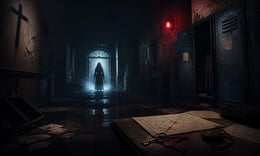


🎮 Evil Nun
⭐ Crazy3D Editor's Pick: Escape a gloomy school while Sister Madeline listens for every mistake, combining exploration, item puzzles, hiding spots, and multiple routes to freedom. It launches in the browser with no installation, while the guide below explains the actual objective and controls before your first serious attempt.
🔎 What Is Evil Nun?
Evil Nun is a first-person escape horror game set inside Eagle's High, a school hiding locked rooms, unfinished rituals, and a relentless pursuer. You do not defeat the nun in a direct fight. You explore, collect useful objects, connect clues, and choose when to move or hide. A dropped item or a rushed route can bring Sister Madeline to your position, turning a simple puzzle into a tense stealth decision.
A good attempt alternates between quiet exploration and deliberate retreat. Search classrooms, corridors, lockers, and ventilation spaces for keys and tools, then test what each item can unlock. Several escape routes change the order of objectives, so learning the school is as important as memorizing the patrol pattern. When danger is close, break line of sight, wait, and return when the next task is safe.
This guide describes the Evil Nun browser build embedded from Miniplay on Crazy3D. The available route, controls, and item names may vary between hosted versions; follow prompts shown in the running game.
🕹️ Core Gameplay: What You Do in Each Round
- Enter the school and identify a safe starting route.
- Search rooms and hidden passages for keys, tools, and clues.
- Listen for Sister Madeline and use lockers, closets, or corners to break pursuit.
- Combine objects and solve one small lock or puzzle at a time.
- Choose an escape route, complete its final objective, and replay to learn a safer path.
The first attempt is best used to understand feedback: notice what causes a loss, what creates progress, and which input gives you time for the next decision. Once that loop is clear, improvement becomes much more consistent than simply restarting and pressing faster.
🎯 Controls
| Action | Keyboard, Mouse, or Touch |
|---|---|
| Move | WASD / Arrow keys |
| Look and interact | Mouse / E / click |
| Run or crouch | Shift / Ctrl when available |
| Pick up or drop an item | F / G or in-game prompt |
| Pause | Esc / in-game button |
If the title screen shows a different key, follow the in-game prompt. This is especially important for browser ports and local multiplayer games, where the host may package a newer or simplified build.
🏆 Game Modes and Progression
- School exploration through locked rooms and alternate paths.
- Stealth escape using hiding and patrol timing.
- Route discovery with several possible escape methods.
Not every mode needs the same strategy. Use practice or solo play to learn a mechanic, then move to competitive or progression modes once the basic inputs no longer require conscious thought.
✨ Key Features
🔹 Sound-driven danger
Footsteps and object noise reveal when it is safe to continue.
🔹 Item-based puzzles
Keys, tools, and clues connect to a route out.
🔹 Hiding and patrols
Lockers, closets, and corners become a stealth toolkit.
🔹 Multiple escapes
Different routes reward players who map the school.
🧠 Strategy Guide: How to Improve
- Learn the nearest hiding place before picking up a noisy object.
- Carry only the item needed for the next objective.
- Use footsteps to estimate direction before opening a door.
- Wait for the patrol to pass instead of forcing a risky interaction.
- Map one route completely before optimizing the fastest run.
Good play usually comes from leaving yourself a second option. Whether that means an escape route, enough energy, a defensive card, a safe lane, or one unused ability depends on the game—but spending every resource on the first opportunity is rarely the strongest choice.
📱 Playing on Desktop and Mobile
Evil Nun benefits from a desktop browser with keyboard movement and a mouse for looking around. Mobile play depends on touch controls in the hosted build; landscape mode gives the clearest view.
Touch support depends on the embedded build. If no virtual controls appear after the game loads, use a desktop browser and keyboard.
❓ Frequently Asked Questions
What is the goal?
Explore the school, solve item puzzles, avoid Sister Madeline, and complete an escape route.
Is it mainly an action game?
It is primarily a stealth and escape horror game. Observation, noise control, hiding, and puzzle order matter most.
Why did the nun find me quickly?
Noise and predictable movement can reveal your position. Pause, listen to the patrol, and hide before returning.
🔗 More Games on Crazy3D
- Granny
- The Baby in Yellow
- Horror Nun
- Backrooms
- Poppy Playtime
- Browse all new games
- Explore the Crazy3D collection


