

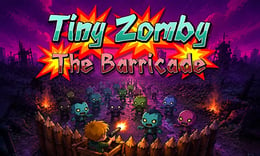


🎮 Tiny Zomby The Barricade
⭐ Crazy3D Editor's Pick: Tiny Zomby The Barricade turns a simple watchtower into a complete defense plan. You aim, shoot, watch the fence, collect the coins dropped by enemies, and decide whether the next purchase should be a mine or a shotgun. Six stages and a boss at the end of each stage give the short sessions a clear rhythm, while the airport finale raises the pressure.
🔎 What Is Tiny Zomby The Barricade?
Tiny Zomby The Barricade is a wave-based zombie defense shooter from Mapi Games. A radiation disaster has left a town full of hostile creatures, and your character is a kid standing on a watchtower with a rifle and a wooden fence. The objective is direct: keep the barricade standing while clearing each attack wave.
The GameMonetize listing describes six stages with six waves each, followed by a boss at the end of every stage. Coins dropped by defeated zombies can be used to prepare for later pressure. Mines let you shape the approach lane, while the shotgun gives you a stronger answer when a wave reaches the fence. The game is compact, but it still asks you to balance immediate accuracy with longer-term upgrades.
The publisher marks the game as mobile ready and gives mouse-click or tap instructions. The GameMonetize play page uses a portrait-oriented 720×1280 game area, so a phone or a tall browser panel may feel more natural than a wide desktop window. Follow the buttons shown on screen if its controls differ.
🕹️ Core Gameplay: What You Do in Each Round
- Enter a stage and watch the first enemies to learn their approach speed and the safest places to aim.
- Drag or move the aim toward the incoming lane, then tap or click to fire before zombies reach the wooden fence.
- Collect the coins dropped after a successful wave and decide whether the next improvement should be damage, mines, or the shotgun.
- Place mines where enemies naturally bunch up, but keep enough direct firepower for targets that survive the blast.
- Clear six waves, defeat the stage boss, and use the experience to prepare for the next stage, especially the tougher airport section.
The key decision is not simply “shoot as fast as possible.” A good defense makes every shot count, protects the fence from leaks, and spends coins before a difficulty jump rather than after the barricade is already failing.
🎯 Controls
| Action | Keyboard, Mouse, or Touch |
|---|---|
| Aim | Mouse drag or Touch drag |
| Shoot | Mouse click or Tap |
| Place a mine | On-screen mine button |
| Buy or switch weapon | On-screen shop or weapon button |
| Pause | In-game menu |
The publisher's instruction is mouse click or tap. Read the shop and mine control icons before the first serious stage. The portrait layout makes touch aiming practical, but desktop mouse control can be more precise when several targets overlap.
🏆 Game Modes and Progression
- The main mode is a linear defense campaign with six stages.
- Each stage contains six waves and ends with a boss encounter.
- Coins create a simple upgrade economy between attacks.
- Mines and the shotgun add different defensive answers to ordinary waves and bosses.
This structure makes the game easy to understand while still giving each attempt a planning layer. Early waves are a chance to learn movement patterns and build money; late waves test whether your purchases protected the fence rather than merely increasing your score.
✨ Key Features
🔹 Watchtower defense
The fixed defensive position keeps attention on aiming, target priority, and the condition of the wooden fence.
🔹 Six-by-six wave structure
Six stages with six waves give each session a readable rhythm and a clear boss checkpoint.
🔹 Mines and shotgun economy
Coins let you prepare for pressure. Mines control a lane, while the shotgun provides a stronger close-range response.
🔹 Portrait-friendly controls
Mouse or touch aiming fits the 720×1280 publisher format and makes the game suitable for a tall mobile play area.
🧠 Strategy Guide: How to Improve
- Aim at the front threat first when it is close to the fence; a distant target cannot damage the barricade yet.
- Place mines where multiple enemies will cross the same path, not where only one slow zombie will step.
- Save enough coins for the next wave's pressure instead of buying a small upgrade immediately after every easy round.
- Use direct shots on survivors after a mine triggers; assuming one explosion cleared everything is a common way to lose fence health.
- Before a boss, check your weapon and mine buttons, then keep the strongest response ready for the moment the boss reaches the danger zone.
📱 Playing on Desktop and Mobile
The publisher marks Tiny Zomby The Barricade as mobile ready, and the portrait 720×1280 game area suits a phone held vertically. Touch drag and tap are the listed inputs. Desktop works too, especially when you want precise aiming with a mouse; keep the browser panel tall enough to see the full lane and shop controls.
❓ Frequently Asked Questions
Is Tiny Zomby The Barricade free to play?
The GameMonetize browser version is presented as a free online game and does not require an app installation. A stable connection is still needed to load the game.
How many stages are there?
The publisher description lists six stages, with six waves and a boss at the end of every stage.
What should I buy first?
Use the early waves to learn the approach lane. Mines are useful against groups, while the shotgun is a stronger answer when enemies get close; choose the option that protects your current weakness.
🔗 Crazy3D Recommendations
- Zombie Defense: Last Stand
- Defense Plants
- Plants vs Zombies War
- Browse New Games
- Explore the Crazy3D collection


