


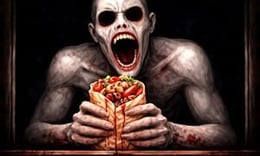


🎮 Scary Shawarma Kiosk: the ANOMALY
⭐ Crazy3D Editor's Pick: In Scary Shawarma Kiosk: the ANOMALY, you manage a food stall while facing eerie customers. Detect anomalies before serving to survive the night. Can you keep your business running amidst the horrors? It launches in the browser with no installation, while the guide below explains the actual objective and controls before your first serious attempt.
🔎 What Is Scary Shawarma Kiosk: the ANOMALY?
Scary Shawarma Kiosk: the ANOMALY is a unique blend of food stall management and horror. Players take on the role of a shawarma stand owner, tasked with serving customers who may not be entirely human. The goal is to prepare food while identifying and avoiding paranormal entities that could jeopardize the business. The game immerses players in a tense atmosphere where every decision counts, and survival hinges on quick thinking and observation.
Players must observe customers closely, using a security camera to spot anomalies before preparing orders. The mechanics involve waiting for customers to approach, checking the camera feed for signs of distortion or erratic behavior, and deciding whether to serve them. If a customer is deemed suspicious, players must close the window instead of serving them. Making too many mistakes attracts the Inspector, increasing the game's difficulty and urgency. Success relies on distinguishing normal customers from paranormal threats under pressure.
This guide describes the hosted Miniplay browser build of Scary Shawarma Kiosk: the ANOMALY. Menus and content may vary in other versions or platforms.
🕹️ Core Gameplay: What You Do in Each Round
- Wait for a customer to approach and listen to their order carefully.
- Check the security camera feed for any signs of anomalies or strange behavior.
- If the customer appears normal, prepare their shawarma and collect payment.
- If you detect an anomaly, close the window without serving them.
- Avoid making five mistakes to prevent the Inspector from appearing and escalating the challenge.
The first attempt is best used to understand feedback: notice what causes a loss, what creates progress, and which input gives you time for the next decision. Once that loop is clear, improvement becomes much more consistent than simply restarting and pressing faster.
🎯 Controls
| Action | Keyboard, Mouse, or Touch |
|---|---|
| action | On-screen control |
| action | Tap to interact with customers |
| action | Swipe to check camera feed |
If the title screen shows a different key, follow the in-game prompt. This is especially important for browser ports and local multiplayer games, where the host may package a newer or simplified build.
🏆 Game Modes and Progression
- Single-player mode where you manage the kiosk through various shifts, facing different challenges each night.
- Endless mode allows players to continue serving customers indefinitely, testing their skills against increasing difficulty.
- Challenge mode introduces specific scenarios with unique conditions to test players' anomaly detection and management skills.
Not every mode needs the same strategy. Use practice or solo play to learn a mechanic, then move to competitive or progression modes once the basic inputs no longer require conscious thought.
✨ Key Features
🔹 Horror Management Simulation
Players prepare food while encountering unpredictable horrors, creating a unique blend of gameplay that keeps them on edge.
🔹 Anomaly Detection System
Utilize security cameras to identify signs of anomalies, requiring keen observation and quick decision-making.
🔹 The Inspector
Accumulate five mistakes to attract the Inspector, a ruthless entity that increases the game's difficulty and urgency.
🔹 Immersive Atmosphere
Experience a chilling environment filled with distorted voices and visual distortions that heighten the sense of paranoia.
🧠 Strategy Guide: How to Improve
- Always check the camera feed before serving a customer to avoid mistakes that could attract the Inspector.
- Trust your instincts; if something feels off about a customer, it's better to close the window than risk serving an anomaly.
- Pay attention to the customer's voice; static or distortion can indicate they are not human.
- Look for physical distortions or erratic movements that suggest a customer is an anomaly.
- Practice makes perfect; the more you play, the better you'll become at spotting anomalies quickly.
Good play usually comes from leaving yourself a second option. Whether that means an escape route, enough energy, a defensive card, a safe lane, or one unused ability depends on the game—but spending every resource on the first opportunity is rarely the strongest choice.
📱 Playing on Desktop and Mobile
Scary Shawarma Kiosk: the ANOMALY is playable on both desktop and mobile devices. The controls are intuitive, allowing for easy interaction whether using a mouse or touch input. Fullscreen mode enhances immersion in the eerie atmosphere.
Touch support depends on the embedded build. If no virtual controls appear after the game loads, use a desktop browser and keyboard.
❓ Frequently Asked Questions
What is the main objective of the game?
The main objective is to serve customers while detecting and avoiding anomalies that could jeopardize your business and lead to failure.
How do I know if a customer is an anomaly?
You can identify anomalies by observing their behavior, physical features, and checking the security camera for any distortions.
What happens if I make too many mistakes?
If you make five mistakes, the Inspector will appear, increasing the difficulty and urgency of your shift.


