

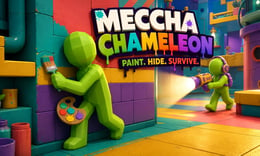


🎨 Meccha Chameleon — Play Hide and Seek by Blending into the Scene
Crazy3D Editor's Pick: The most exciting aspect of Meccha Chameleon is the upgrade from "finding hiding spots" to "creating your own disguise." You need to paint your featureless, pure white humanoid to blend in with walls, floors, signs, or scene decorations, using poses and shadows to deceive the seekers. It tests not only your reaction speed but also your color observation, spatial judgment, and on-the-spot creativity; a successful bold disguise often feels more rewarding than hiding in the deepest corner.
🫥 Welcome to: A Game of Hide and Seek Where Color, Poses, and Observation Determine Victory!
Meccha Chameleon is a 3D multiplayer party game developed and published by lemorion_1224. Players are divided into Hiders and Seekers: Hiders find their spots during the preparation phase, paint their bodies, and strike poses; Seekers then enter the map and must find all disguised players before the countdown ends.
The biggest difference from traditional Prop Hunt is that characters do not instantly transform into chairs or boxes. Each Hider retains the outline of a featureless humanoid and must rely on paint, color picking, materials, poses, and positioning to appear as part of the environment. Even if two players choose the same wall, their disguises can look completely different due to their painting styles.
The official Steam page lists "hiding spots, poses, and painting skills" as key to survival and recommends play for 2–10 players. The version hosted here is provided by Miniplay, and specific modes, maps, and controls may vary with updates to the hosted version.
This round's theme: Paint, Hide, Survive—observe the environment, create your disguise, and finally stay still and outsmart the seekers until the round ends!
🎬 Gameplay Video: Watch a Round of "Prop Hunt But With Paint"
The following YouTube stream, "Prop Hunt But With Paint," showcases the rhythm of selecting spots, painting, posing, and searching. A few minutes of viewing will help you understand why a seemingly ordinary corner might be hiding a player.
🎮 Core Gameplay: Spot Selection, Painting, Disguising, and Searching
A typical round of Meccha Chameleon is divided into two phases:
- Preparation and Painting Phase: Hiders quickly explore the map, choose backgrounds, copy colors from the environment, paint corresponding blocks and textures on their bodies, and finally adjust their poses and orientations.
- Searching Phase: Seekers enter the map, checking for color discrepancies, unnatural outlines, incorrect shadows, and subtle movements, marking all Hiders before time runs out.
Simply painting your entire body one color is usually not enough. Walls may contain highlights, shadows, borders, stains, and decorative strips, requiring a base color to cover a large area first, followed by adding lines from the environment. Seekers also cannot just focus on dark corners; experienced players may intentionally stand in well-lit areas, allowing accurate textures and calm poses to hide them.
⌨️ Basic Controls Guide
| Action | Description | Default Keyboard / Mouse |
|---|---|---|
| Move | Search for hiding spots or explore the map | W A S D |
| Observe | Rotate the camera to check the environment and character outlines | Move mouse |
| Open Painting Menu | Enter or exit the body painting interface | F |
| Paint / Mark | Color your body; confirm targets while searching | Left mouse button |
| Pick Color from Environment | Copy the color of walls, floors, or props | Middle mouse button |
| Adjust Brush Size | Zoom in or out of the brush range | Mouse scroll wheel |
| Adjust Pose | Open the pose menu to change character outlines | R (in some versions) |
The browser-hosted version may use different color picking keys, pose keys, or touch screen buttons. If in-game prompts differ from the table above, please follow the instructions displayed on your screen.
🕹️ Game Modes: Three Rules That Change the Pace of the Game
Different versions or host settings may use various names, but the three common modes are Normal / Basic, Increasing Oni / Infection, and Double.
👀 Normal / Basic
The easiest to understand standard hide-and-seek. A fixed number of Seekers chase the Hiders; players who are found leave the round or enter spectator mode. Seekers win by finding everyone within the time limit, while the Hiders can win if at least one remains hidden until the countdown ends.
Normal mode is suitable for players new to painting tools. The team dynamics do not change mid-game, allowing you to focus on learning the map, color picking, poses, and basic search routes.
🧟 Increasing Oni / Infection
Found Hiders do not stay in spectator mode but join the Seekers. As more players are discovered, the number of Seekers on the map increases, and the last Hider faces pressure from multiple directions.
This mode is particularly suitable for larger rooms: players eliminated early can still participate, and the second half of the round heats up as "more hunters appear."
🔁 Double
All players first complete their hiding spots and painting, then enter a unified searching phase to find other players' disguises. It resembles a competition combining "creative exams" and "observation races": you must design a disguise that is hard to detect while efficiently finding others' creations.
Double mode is ideal for groups familiar with the map, as everyone must showcase both hiding and searching skills simultaneously.
The update pace of the hosted version may differ from the official PC version. If the lobby only shows some modes, please refer to the options actually provided in the host interface.
🌟 Core Features: Why It’s Not Just Ordinary Hide and Seek?
🎨 Free Painting Disguise (Meccha Paint)
Characters start with a pure white body, and you can directly paint the environmental colors onto your head, torso, and limbs. An excellent disguise not only matches the main color but also extends wall seams, borders, shadows, and textures onto the body. The goal of painting is not to look "pretty," but to appear as if you "belong there" from the Seekers' perspective.
🧍 Poses Change the Outline
Similar colors do not equal invisibility. Round heads, shoulders, arms, and legs can expose your humanoid shape, so you need to use poses to break the familiar body outline. Positioning close to corners, pillars, frames, shelves, or decorative edges can make limbs appear as lines and structures in the scene.
🔦 Two Camps, Two Ways of Thinking
- Hiders: Observe the environment, plan from the Seekers' perspective, copy colors, control outlines, and remain still during the searching phase.
- Seekers: Divide the map into sections, looking for sudden texture interruptions, incorrect lighting, protruding wall thickness, and slight movements from nervous players.
Hiding requires patience and creativity, while searching relies on observation and reasoning. After character rotation, your learned hiding techniques will become clues for finding opponents in the next round.
🌐 Public Matches and Friends Rooms
The official version supports both public and private rooms. Public matchmaking allows you to see the creative painting ideas of unfamiliar players; private rooms are perfect for friends to strategize, adjust round rules, and review near-successful disguises after the game.
🗺️ Detail-Rich 3D Maps
Colorful wall tiles, shelves, pipes, frames, signs, and shadows can all become materials for disguises. The more familiar you are with the map, the better you can judge which textures are easy to replicate, which angles create parallax, and where Seekers typically check first. The official PC version also supports Steam Workshop, but the browser-hosted version may not include custom map features.
📌 Advanced Tips: Make Your Disguise Harder to Detect
- Choose a Spot First, Then Open the Brush: Don’t waste preparation time standing in the middle of the map. Determine your final orientation first, then copy the actual light and color from that position.
- Base Color First, Then Details: Cover your body with the main color using a large brush, then shrink the brush to add seams, stripes, and shadows. This is more stable than starting with small details.
- Use Three to Four Similar Colors: A monochromatic character will stand out like a sticker against a complex wall. Adding highlights, shadows, and environmental reflections will make the material appear more natural.
- Prioritize Exposed Areas: When time is short, paint the head, chest, and front arms that Seekers are most likely to see first; the back can be simplified.
- Stop Immediately After Finishing: No matter how accurate the color, it can’t withstand movement. Once the searching phase begins, don’t move repeatedly for a slight color difference.
- Use Poses to Extend Environmental Lines: Let your arms stretch along wall edges or decorative strips, and align your legs with vertical structures; this is more convincing than simply curling up.
- Check Parallax from the Side: A perfectly disguised front may expose thickness from the side. Before preparation ends, rotate the camera to check if your head and feet protrude from the background.
- Don’t Always Hide in the Darkest Corners: Skilled Seekers will check traditional hiding spots first. Well-lit, clearly textured open areas can sometimes be safer.
- Seekers Should Move Laterally: Don’t just stand still and rotate the camera. Moving side to side will create noticeable parallax for wall-hugging characters, making disguises easier to spot.
- Divide Responsibilities in Multi-Player Searches: Have teammates cover high places, ground, rooms, and corridors separately to avoid everyone checking the same area.
💻 Browser Version and Official Version Notes
Crazy3D currently loads the browser version through Miniplay's public embed page, allowing you to start directly on the page. The official version of Meccha Chameleon will launch on Steam on June 9, 2026, and the developer will continue to adjust character models, expressions, painting tools, and room features, so the browser-hosted version may differ from the official PC version in modes, maps, controls, or update progress.
If the page fails to load, please ensure your browser allows JavaScript, cookies, and WebGL, temporarily disable extensions that may block game resources, and refresh the page. Stable internet is also required for multiplayer matchmaking; initial loading of 3D resources may take a moment.
🌐 Play Now
- ▶ Play Meccha Chameleon for Free Online at Crazy3D
- Browse More Animal Games
- Explore More Crazy 3D Games
- Check Out the Latest Added Games
🎉 Grab your brush now: choose a bold spot, paint yourself into the scene, and survive until the end right under the Seekers' noses!


