

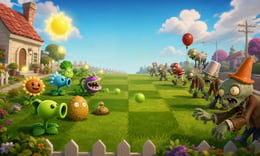


🎮 Plants Vs Zombies
⭐ Crazy3D Editor's Pick: Build a lane-by-lane garden defense, collect sunlight, choose plants for different jobs, and stop increasingly varied zombie waves before they reach the house. It launches in the browser with no installation, while the guide below explains the actual objective and controls before your first serious attempt.
🔎 What Is Plants Vs Zombies?
Plants Vs Zombies is a classic tower-defense strategy game with an easy-to-read battlefield and a surprising amount of planning. Zombies advance across separate lawn lanes, while plants provide damage, slowing effects, protection, resources, or special responses. The core challenge is deciding what to plant now and what to save for the next wave. A sunflower can fund the defense, a wall can buy time, and a well-timed special plant can turn a crowded lane around.
Each stage begins with a limited plant selection and a lawn that gradually fills with threats. Collect sunlight, place the right plant in the right lane, and watch how the wave changes before spending your next resource. Build an economy first, establish a reliable damage line, and keep a reserve for fast or armored zombies. Later stages add tougher patterns and plants that reward deliberate timing.
This guide describes the Plants Vs Zombies browser build embedded from Miniplay on Crazy3D. The hosted version is a browser adaptation, so plant names, level order, and controls can differ from downloadable editions.
🕹️ Core Gameplay: What You Do in Each Round
- Review the available plants and identify an economy or early lane-control option.
- Collect sunlight and place an economy plant before the first wave becomes dangerous.
- Build a damage line, then add walls or special plants where a lane may break.
- Watch zombie types and adjust the next placement instead of repeating one plant everywhere.
- Survive the wave, unlock the next option, and refine the defense for the next stage.
The first attempt is best used to understand feedback: notice what causes a loss, what creates progress, and which input gives you time for the next decision. Once that loop is clear, improvement becomes much more consistent than simply restarting and pressing faster.
🎯 Controls
| Action | Keyboard, Mouse, or Touch |
|---|---|
| Select a plant | Mouse click / touch |
| Place a plant | Click or tap a lawn lane |
| Collect sunlight or drops | Click / tap |
| Remove a plant | Shovel or in-game tool |
| Pause | Esc / in-game button |
If the title screen shows a different key, follow the in-game prompt. This is especially important for browser ports and local multiplayer games, where the host may package a newer or simplified build.
🏆 Game Modes and Progression
- Adventure progression with new plants and zombie patterns.
- Resource management across several lawn lanes.
- Relaxed garden experimentation for testing combinations.
Not every mode needs the same strategy. Use practice or solo play to learn a mechanic, then move to competitive or progression modes once the basic inputs no longer require conscious thought.
✨ Key Features
🔹 Readable lane strategy
Separate lanes make the battlefield clear while still demanding priorities.
🔹 Distinct plant roles
Sun producers, attackers, blockers, and special plants solve different problems.
🔹 Escalating waves
New zombie behaviors change which defenses are efficient.
🔹 Fast browser restarts
A failed defense can be rebuilt quickly with a better plan.
🧠 Strategy Guide: How to Improve
- Protect your sunlight economy early.
- Do not spend every resource on the first lane that looks dangerous.
- Use blockers to buy time for damage plants.
- Read the zombie preview and reserve a counter for the likely breaker.
- When replaying, change placement order before changing every plant.
Good play usually comes from leaving yourself a second option. Whether that means an escape route, enough energy, a defensive card, a safe lane, or one unused ability depends on the game—but spending every resource on the first opportunity is rarely the strongest choice.
📱 Playing on Desktop and Mobile
Plants Vs Zombies works well with mouse or touch controls because its board is lane-based. Desktop provides precise placement; mobile players should tap the intended lane carefully and use landscape mode when suggested.
Touch support depends on the embedded build. If no virtual controls appear after the game loads, use a desktop browser and keyboard.
❓ Frequently Asked Questions
What is the main goal?
Place plants strategically, generate enough sunlight, and stop each zombie wave from crossing the lawn.
Which plant should beginners prioritize?
A reliable sunlight producer is usually the best first investment, followed by an attacker and a blocker.
Is this the same as Plants vs Zombies Fusion?
No. Crazy3D lists the classic browser build separately from the existing Plants vs Zombies Fusion page.
Can I play without downloading?
Yes. The embedded browser version runs from the Crazy3D page after the hosted files load.
🔗 More Games on Crazy3D
- Plants vs Zombies: Fusion
- FireBoy and WaterGirl: The Forest Temple
- Level Devil 2
- Color Block Jam
- Screw Master: Pin Puzzle
- Browse all new games
- Explore the Crazy3D collection


