

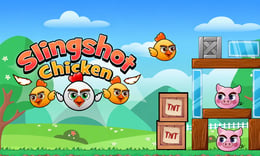


🎮 Slingshot Chicken
⭐ Crazy3D Editor's Pick: Slingshot Chicken invites players to engage in a whimsical world where careful aiming and clever strategies are key to solving colorful puzzles. With humorous chickens as projectiles, each level presents unique challenges that require thoughtful planning and precision. It launches in the browser with no installation, while the guide below explains the actual objective and controls before your first serious attempt.
🔎 What Is Slingshot Chicken?
In Slingshot Chicken, players embark on a vibrant adventure filled with 24 creatively designed stages. The goal is to solve tricky puzzles by launching chickens from a slingshot, navigating through various obstacles and hazards. Each level increases in difficulty, encouraging players to think critically and aim accurately to conquer the challenges ahead.
Players control a slingshot using the left mouse button to pull back and adjust the direction and strength of their shot. Each stage features moving obstacles and tricky targets, requiring players to think creatively. Clever ricochets can often help reach difficult targets, making strategy more important than brute force. Completing puzzles unlocks new, more challenging levels, maintaining an engaging pace throughout the game.
This guide describes the hosted version of Slingshot Chicken on 1Games. Menus and content may vary in other builds or platforms.
🕹️ Core Gameplay: What You Do in Each Round
- Observe the layout of each stage to identify obstacles and potential launch angles.
- Adjust the slingshot's pull to control the strength and direction of your shot.
- Launch the chicken and watch its trajectory, considering ricochets and obstacles.
- Evaluate the outcome and refine your strategy based on the results.
- Complete the puzzle to unlock the next stage, continuing the adventure.
The first attempt is best used to understand feedback: notice what causes a loss, what creates progress, and which input gives you time for the next decision. Once that loop is clear, improvement becomes much more consistent than simply restarting and pressing faster.
🎯 Controls
| Action | Keyboard, Mouse, or Touch |
|---|---|
| Launch chicken | Left mouse button |
| Adjust aim | Mouse movement |
| Reset level | On-screen control |
If the title screen shows a different key, follow the in-game prompt. This is especially important for browser ports and local multiplayer games, where the host may package a newer or simplified build.
🏆 Game Modes and Progression
- Single-player mode allows players to progress through 24 unique stages, each increasing in difficulty and complexity.
- Puzzle mode challenges players to solve each stage using the least number of shots possible, promoting strategic thinking.
- Time trial mode encourages players to complete levels as quickly as possible, adding an extra layer of challenge.
Not every mode needs the same strategy. Use practice or solo play to learn a mechanic, then move to competitive or progression modes once the basic inputs no longer require conscious thought.
✨ Key Features
🔹 24 main stages
Each stage presents a unique puzzle that gradually increases in difficulty, ensuring a fresh challenge with every level.
🔹 Colorful graphics
Bright and cheerful backgrounds enhance the arcade experience, making each stage visually appealing.
🔹 Physics-based mechanics
The game utilizes realistic physics to create engaging slingshot mechanics that affect how chickens travel.
🔹 Smooth animations
Fluid animations contribute to the overall enjoyment, making the gameplay feel dynamic and responsive.
🧠 Strategy Guide: How to Improve
- Study each layout carefully to find the best angles for launching chickens, avoiding unnecessary risks.
- Control your launch power to achieve more accurate shots, as balanced strength often yields better results than maximum force.
- Experiment with clever ricochets to reach targets that are otherwise difficult to hit directly.
- Take your time to plan each shot, as rushing can lead to missed opportunities and wasted attempts.
- Practice makes perfect; the more you play, the better you'll become at predicting trajectories and solving puzzles.
Good play usually comes from leaving yourself a second option. Whether that means an escape route, enough energy, a defensive card, a safe lane, or one unused ability depends on the game—but spending every resource on the first opportunity is rarely the strongest choice.
📱 Playing on Desktop and Mobile
Slingshot Chicken is designed for both desktop and mobile play, utilizing mouse controls for precision aiming. The game can be played in fullscreen mode for an immersive experience, making it suitable for various devices.
Touch support depends on the embedded build. If no virtual controls appear after the game loads, use a desktop browser and keyboard.
❓ Frequently Asked Questions
What is Slingshot Chicken?
Slingshot Chicken is an arcade puzzle shooter where players launch chickens from a slingshot to solve colorful puzzles across various stages.
How do I control the slingshot?
You control the slingshot by pulling back with the left mouse button to adjust the direction and strength of your shot.
Are there different game modes?
Yes, the game features single-player, puzzle, and time trial modes, each offering unique challenges and gameplay experiences.


