

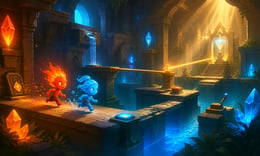


🎮 FireBoy and WaterGirl 2: The Light Temple
⭐ Crazy3D Editor's Pick: Guide FireBoy and WaterGirl through a crystal-filled temple, activate switches, collect matching gems, and use two characters to solve platform puzzles together. It launches in the browser with no installation, while the guide below explains the actual objective and controls before your first serious attempt.
🔎 What Is FireBoy and WaterGirl 2: The Light Temple?
FireBoy and WaterGirl 2: The Light Temple is a cooperative puzzle-platform game in which two characters must reach the exit of every cave. FireBoy and WaterGirl have different elemental strengths and weaknesses, so a route that is safe for one can be dangerous for the other. The Light Temple adds switches, beams, bridges, moving platforms, and gem routes that reward communication or careful character switching when playing alone.
A level is a chain of small problems rather than a race to the door. Move one character to hold a switch, use the other to cross a newly opened path, then reunite them near the exit. Collecting gems improves the run but should not make you abandon a safe route. Read the whole room first, identify which controls are temporary, and use both characters as a pair.
This guide describes the FireBoy and WaterGirl 2 browser build embedded from Miniplay on Crazy3D. The hosted version may use different labels or simplified controls, so follow the prompts shown in the game.
🕹️ Core Gameplay: What You Do in Each Round
- Enter a temple level and identify the exit, gems, switches, and hazards.
- Move FireBoy and WaterGirl separately to activate mechanisms and open a safe route.
- Use the correct character for each element, platform, and pool.
- Collect reachable gems while keeping a fallback route open.
- Bring both characters to the exit, then replay to improve time or collection.
The first attempt is best used to understand feedback: notice what causes a loss, what creates progress, and which input gives you time for the next decision. Once that loop is clear, improvement becomes much more consistent than simply restarting and pressing faster.
🎯 Controls
| Action | Keyboard, Mouse, or Touch |
|---|---|
| Move FireBoy | Arrow keys |
| Move WaterGirl | WASD |
| Switch active character | Space / in-game prompt |
| Restart a level | R / in-game button |
| Pause | Esc / in-game button |
If the title screen shows a different key, follow the in-game prompt. This is especially important for browser ports and local multiplayer games, where the host may package a newer or simplified build.
🏆 Game Modes and Progression
- Temple level progression through increasingly complex rooms.
- Two-player cooperation on one keyboard when supported.
- Solo character switching for solving both sides of a puzzle.
Not every mode needs the same strategy. Use practice or solo play to learn a mechanic, then move to competitive or progression modes once the basic inputs no longer require conscious thought.
✨ Key Features
🔹 Asymmetric characters
Different safe surfaces make cooperation part of every route.
🔹 Switch-based puzzles
Levers, bridges, light beams, and moving platforms create layered decisions.
🔹 Gem collection
Optional gems add a second goal for players optimizing a completed route.
🔹 Local co-op friendly
Two players can coordinate on one keyboard when both control sets appear.
🧠 Strategy Guide: How to Improve
- Look at the whole room before moving into a one-way section.
- Keep the character holding a switch safe until the other crosses.
- Use short test movements near hazards.
- Treat gems as optional until the exit route is secure.
- When playing solo, switch often enough that neither character becomes stranded.
Good play usually comes from leaving yourself a second option. Whether that means an escape route, enough energy, a defensive card, a safe lane, or one unused ability depends on the game—but spending every resource on the first opportunity is rarely the strongest choice.
📱 Playing on Desktop and Mobile
The game is best on desktop because it supports two control sets and precise platform movement. A keyboard is recommended for local co-op; touch devices may work only when virtual controls are provided.
Touch support depends on the embedded build. If no virtual controls appear after the game loads, use a desktop browser and keyboard.
❓ Frequently Asked Questions
Can two people play?
Yes, when the hosted build exposes both keyboard control sets. One player can also switch characters for solo play.
What is the main objective?
Guide both characters through each room, avoid elemental hazards, collect useful gems, and reach the exit together.
Why does one character die?
FireBoy and WaterGirl are not interchangeable. Check the color and element of each hazard before jumping.
Is it related to the Forest Temple page?
Yes. It is a separate Light Temple entry in the same FireBoy and WaterGirl series.
🔗 More Games on Crazy3D
- FireBoy and WaterGirl: The Forest Temple
- Plants Vs Zombies
- Level Devil 2
- Color Block Jam
- Meccha Chameleon
- Browse all new games
- Explore the Crazy3D collection


