

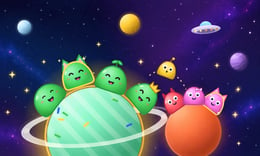


🎮 Orbit Pals
⭐ Crazy3D Editor's Pick: Small planets make every spare space valuable in Orbit Pals. Moving a matching group feels straightforward until the next group underneath needs somewhere else to go, giving this alien sorting puzzle a useful little planning challenge.
🔎 What is Orbit Pals?
Orbit Pals is a space-themed sorting game from SPNK Studio. Your task is to organize alien groups across planets with room for four occupants each. You move an accessible outer group to an empty planet or a compatible group of the same species, gradually bringing matching aliens together.
The interesting decision is often what a move reveals. Putting two matching groups together can tidy one planet while exposing a different species on the planet they left. Before transferring anything, look at both ends of the move: the destination needs room, and the newly exposed group will need a useful place of its own.
The publisher's game listing describes the browser edition and its additional puzzle features. Follow the current game's own prompts if a control or available option differs in the hosted version.
🕹️ How a puzzle works
- Read the arrangement. Find the empty planets, identify matching outer groups, and notice which aliens are buried behind other groups. Think of an empty planet as working space you can spend carefully.
- Select an accessible group. Choose the outer group on a planet. Check its species and size before deciding where to send it; a promising destination still needs enough space for the move.
- Choose a compatible destination. Tap or drag toward an empty planet or a matching species. Use the game's response to confirm that the transfer is allowed before planning your next action.
- Reassess the exposed groups. After each transfer, scan the planets again. A move that initially looked unhelpful may have uncovered the matching group you needed elsewhere.
- Finish organizing the board. Continue until the puzzle recognizes the sorted arrangement. Review the result, then begin another board or explore the other puzzle options shown in the menu.
🎯 Controls
| Action | Mouse or touch input |
|---|---|
| Select a planet or alien group | Click or Tap |
| Choose where a selected group goes | Click or Tap the destination |
| Move a group directly | Drag toward the destination |
| Revisit a move | Use the on-screen Undo button |
| Start the current puzzle again | Use the on-screen Restart button |
| Ask for help | Use the on-screen Hint button |
| Access extra sorting space | Use the on-screen Extra Planet option |
Check any conditions displayed before using assistance. The availability and behavior of these buttons may differ in the hosted build; this guide does not assume that every helper is unlimited or free of an additional prompt.
🏆 Puzzle options and progression
The publisher lists generated puzzles, results rated up to three stars, a daily puzzle, nine alien species, and a Lab feature involving hybrids. Use the menus to see which options are currently available and how they are introduced.
For a first session, concentrate on understanding legal transfers rather than chasing a particular rating. The listing does not establish the exact star formula, so watch the result screen before deciding whether a replay should emphasize fewer moves or some other condition.
✨ What makes the sorting interesting?
Four places per planet
A small capacity makes space easy to count. As a planning habit, count the destination's vacant places before selecting a large group. This should help avoid building a sequence around a transfer that cannot fit.
Access starts at the outside
The visible outer group determines what you can work with now. Treat deeper groups as future tasks: first ask which move would expose them, then decide whether that move leaves the rest of the board manageable.
Matching and empty destinations
These two destination types serve different purposes. A matching destination can consolidate a species; an empty one can temporarily relieve a crowded arrangement. Try to recognize which purpose a move serves before making it.
Several ways to reconsider
Undo, restart, and hints offer different ways to approach a difficult position when available. Undo suits a recent mistake, while a restart lets you try a substantially different opening. A hint can be useful if you pause to understand the suggested move.
🧠 Five practical sorting tips
- Keep one flexible destination when possible. Avoid occupying every empty planet just to make the board look tidier. Spare capacity may help you uncover a blocked species later.
- Plan one transfer beyond the obvious match. Ask what becomes accessible after that match and where it might go. This short check is easier than trying to solve the entire board mentally.
- Count spaces explicitly. Compare the selected group's size with the destination's capacity instead of relying on the appearance of a small gap.
- Give temporary storage a purpose. Before moving aliens to an empty planet, identify the group you hope to expose. This helps distinguish a useful rearrangement from aimless shuffling.
- Learn from a restart. Remember the first decision that made your options narrow, and change that decision next time. Repeating the same opening without reviewing it rarely teaches much.
📱 Desktop and mobile play
The publisher marks Orbit Pals as mobile-ready and describes mouse and touch input. A larger screen may make crowded arrangements easier to inspect. On a phone, choose an orientation that keeps the whole board visible, and use fullscreen if the player offers it. Device and browser support can vary.
❓ Frequently asked questions
**Is Orbit Pals free to play?
It is offered as a free browser game. Read any hosted-player prompts before choosing optional assistance.
**What is the main objective?
Arrange matching alien species together by transferring accessible groups between compatible planets.
**Do I need a keyboard?
The listed controls use clicking, tapping, or dragging. Follow the on-screen instructions for the version you load.
🔗 More puzzles on Crazy3D
Continue with Coin Color Sort, Slinky Color Sort, or Color Block Jam. You can also browse New Games and the Crazy3D collection.
▶️ Play Orbit Pals
Take a moment to count your empty spaces, then play Orbit Pals on Crazy3D.


