



🎮 Try Again
⭐ Crazy3D Editor's Pick: A small ball, a visible exit, and a route that deserves more suspicion than it first receives. Try Again makes each failed jump useful: watch what caught you, adjust one decision, and put the next attempt to work.
🔎 What is Try Again?
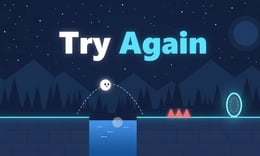
Try Again is a single-player, side-view ball platformer by UriRapaport. Roll across platforms, jump obstacles, and reach the glowing portal. Its opening level combines a raised block, a blue gap, and a red projectile travelling along the floor, so simply holding right is not a dependable plan.
The dark mountain-and-pine backdrop leaves the cyan platform edges and exit easy to identify. The challenge is reading the space between them. You need to think about both where the ball will land and what might cross its path on the way there.
🕹️ How a run works
- Choose Play from the menu to start. The hosted player may show an advertising countdown before the game appears; let that finish normally.
- Examine the route from the ball's starting position on the left toward the portal. Locate the block, gap, and approaching projectile before committing to a jump.
- Roll toward an obstacle and jump with enough room to clear it. Watch the landing area rather than only the ball.
- If you fail, the cracked-ball effect and TRY AGAIN message appear. Follow the press any key prompt, then use the next attempt to change your approach.
- Reach the portal to complete the level. The result screen shows your attempts and offers Next or Menu. An advertisement can appear between levels too.
🎯 Controls
| Action | Keyboard or interface |
|---|---|
| Roll left or right | ← / → or A / D |
| Jump | Space |
| Retry after failure | Follow the press any key prompt |
| Start or choose a level | Click Play or Level Select |
| Change ball appearance | Open Ball Color |
| Adjust audio | Use the Music and Sound menu switches |
| Additional publisher-listed shortcuts | ↑ / W to jump; Esc / P to pause |
| Publisher-listed touch controls | Hold the left button to roll; tap the right button to jump |
Keyboard rolling and the Space jump are confirmed in the hosted game. The additional shortcuts and touch controls come from the publisher and have not been independently checked here. Follow the on-screen instructions if your player behaves differently.
🏆 Levels and progression
The menu includes Level Select and Ball Color, alongside the regular Play option. The first completion screen records the number of tries, making a cleaner replay a useful personal target for the next time you play.
The publisher's game page describes 70 levels, a new zone and boss level every ten levels, and ball colors unlocked through progress. Those are publisher-described later features; this guide's practical examples come from the opening level. Check the game's own menus for your current access and unlock requirements.
✨ Four features that shape the challenge
A clear route with an inconvenient projectile
The first exit is visible across a compact course, but a red projectile crosses the floor. A clear view of the destination does not mean the path is safe. Watch horizontal traffic as well as the edges beneath the ball.
Obstacles that ask different questions
The raised block tests how you approach a change in height; the blue gap asks whether your jump will carry you to a safe landing. Treat them as separate decisions instead of trying to solve the whole level with one uninterrupted input.
Attempts that stay visible
The Try counter increases across failures, and the completion screen reports your tries. It gives each restart context: you can remember what changed between attempts instead of rushing through a sequence of identical mistakes.
More than a fixed route to memorize
The publisher describes disappearing floors, traps, and behavior that can vary between attempts later in the game. That makes observation a useful habit from the beginning. It is not a promise that every opening-level retry generates a new map or rearranges every obstacle.
🧠 Five useful tips
- Look at the projectile before moving. When you can see the red threat, judge where it is relative to your approach. A jump aimed only at the block may overlook a hazard closer to the floor.
- Separate the block from the gap. First work out a reliable way over the raised section. Then concentrate on where to take off for the gap, rather than changing both decisions on every retry.
- Choose a visible takeoff reference. Use the block edge or another clear feature as a reminder of your jump position. Adjust that reference gradually if an attempt falls short or lands badly.
- Change one thing after a failure. Try a different takeoff position or movement timing, not both at once. You will have a better idea of which change actually helped.
- Use the counter as feedback, not pressure. A higher try count is still useful if it reveals a trap or a safer line. Before restarting, name the mistake you want the next attempt to fix.
📱 Desktop and mobile experience
A desktop or laptop with a keyboard is the clearest starting point because rolling and jumping have been checked in that setup. Give the game enough screen space to see the projectile and portal together; a wide view suits its horizontal layout.
The publisher marks the game mobile-ready and supplies touch instructions, but mobile responsiveness and button placement may differ by device. Follow the controls shown in your player rather than assuming keyboard shortcuts translate directly. Music and Sound have separate menu switches if you prefer a quieter session.
❓ Frequently asked questions
Is Try Again free to play?
You can play this browser version free on Crazy3D. The hosted player can show advertisements before play or between levels, so free does not mean ad-free.
What am I trying to reach?
Guide the ball to the glowing portal while avoiding hazards and failed jumps. Reaching the first portal brings up a level-complete screen with an attempt total.
Is every retry a different level?
Do not assume so. The publisher describes attempt-dependent behavior, but the opening course still has recognizable obstacles to learn. Observe what actually changes rather than treating every failure as random.
🔗 More games on Crazy3D
For another ball or platform challenge, explore Rollance Going Balls, Geometry Rush, and Lumen Descent.
Browse New Games for recent additions, or visit the Crazy3D game collection to choose your next session.
▶️ Play Try Again now
Start with the first obstacle, learn one useful detail from each mistake, and work toward the portal: play Try Again free online on Crazy3D.


