

Harbor Master Container Tycoon
A port shift
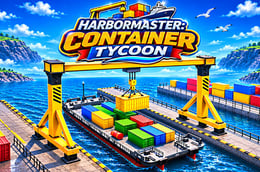
A container can be only a few metres from its destination and still take several adjustments to place. Harbor Master Container Tycoon puts you in charge of a 3D cargo port, with industrial vehicles to drive and ships to load or unload. Instead of racing through a course, you work through a chain of smaller tasks: drive to the cargo, line up, lift, transport and set it down. The developer, MGS Studio, also describes facility upgrades and harbor expansion.
How to play
- Read the current mission and identify the container and destination before moving.
- Approach the relevant vehicle and press E to get in. Rotate the camera before setting off so you know which way it is pointing.
- Drive to the pickup with W and S, steering with A and D. Brake near the cargo and use Q once aligned.
- Raise the container with R for transport. Drive toward the delivery area using space to brake before tight turns.
- Stop at the destination, lower the container with F and detach it with Q. Consult the objective before collecting the next load.
Controls
| Controls | ⌨ |
|---|---|
| Forward / reverse | W / S |
| Steer left / right | A / D |
| Brake | Space |
| Enter / exit vehicle | E |
| Attach / detach container | Q |
| Raise / lower container | R / F |
| Change camera / rotate view | C / Mouse |
| Accelerate / pause | Shift / Esc |
Missions and progression
The game features logistics missions that involve ships, the yard and cargo transport. Try reading each mission as a pickup-and-delivery sequence: note the origin and destination, then decide where you need space for the final approach. The publisher lists upgrades and expansion, but does not specify a fixed number of levels or separate game modes.
Four things that set it apart
Ships and yard
Work involves both ship cargo and the container yard, so the destination matters as much as the pickup.
Different machines
The port has multiple heavy vehicles. Allow a moment to get oriented after entering one rather than assuming it handles like your previous vehicle.
Separate lift controls
Attaching, raising, lowering and detaching are distinct actions. You can plan each part of the lift separately.
Port growth
Facility upgrades and expansion sit alongside the logistics missions, giving you something to work towards beyond the next delivery.
Tips for smoother deliveries
- Look at the destination before picking up the cargo. This makes it easier to choose an approach that leaves room to straighten the vehicle.
- Brake before the pickup point rather than on top of it. Use the remaining distance to make small steering corrections.
- Check the container from another angle if its position looks ambiguous. A different view is often more useful than repeatedly pressing the attachment key.
- Save acceleration for open stretches. When space is limited, a slow approach lets you concentrate on turning and placement.
- Treat lowering and detaching as separate checks. Make sure you are at the intended spot before releasing the load.
Desktop and controls
Use a desktop browser with a keyboard and mouse. The distributor does not mark this build as mobile-ready. Click the play area to give it focus if the key presses are reaching the surrounding page instead.
Frequently asked questions
- Is this a race? The published focus is port logistics, not finishing ahead of other cars.
- How do I release a container? Lower it with F and use Q to detach it.
- Can I change the view? Yes. C changes the camera and moving the mouse rotates the view.