





🎮 War The Knights
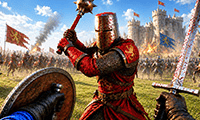
⭐ Crazy3D Editor's Pick: A sword fight becomes a different challenge when a whole army is moving around you. War The Knights combines direct weapon combat with large medieval battles. Watch the fight while choosing when to attack, defend, or support allies.
🔎 What is War The Knights?
War The Knights is a 3D medieval battle game built around rival factions, varied weapons, and fighting alongside an army. You choose a side and take part in battles that the publisher describes as supporting up to 200 warriors. Swords and spears cover close combat, while bows and crossbows give you ranged options. Shields, throwing weapons, and special abilities add further decisions.
This guide covers the browser edition published by Prime Web Publish on GameDistribution, listed there on November 4, 2026. Individual action meets team fighting: a good attack matters, but so does noticing where your allies are fighting and whether your equipment suits the situation.
🕹️ How to approach a battle
- Choose your faction and read the opening prompts. Check the options and current objective shown by the game before entering the fight. Follow the loaded edition's instructions if its menus differ from another release.
- Get familiar with your equipment. Identify your main weapons and gadgets. Learn the attack, protection or aim, and throw commands before joining a crowded battle.
- Move with the fight in view. Use WASD to position yourself and Shift to run. Watch nearby allies and enemies rather than focusing only on the closest opponent.
- Match your action to the distance. Use the equipment available to you for close or ranged combat, protect yourself when needed, and reconsider your position before committing to another attack.
- Work toward your side's objective. Support allies and follow the battle's displayed conditions. When a result or continuation screen appears, use its options and consider what to change about your approach.
🎯 Keyboard and mouse controls
| Action | Input |
|---|---|
| Move | W, A, S, D |
| Attack | Left mouse button |
| Protect or aim | Right mouse button |
| Throw | Middle mouse button |
| Crouch | Z |
| Interact | E |
| Run | Shift |
| Select a main weapon | 1, 2 |
| Select gadgets | 3, 4 |
| Battle cry | R |
| Throw your melee weapon | G |
| Kick | F |
| Open the pause menu | P |
These are the controls supplied for the GameDistribution edition. Keep the general throw command separate from throwing your melee weapon: they use different inputs. Protection and aiming share the right mouse button, so pay attention to your selected equipment. A hosted version may differ; follow its on-screen prompts if a control changes.
🏆 Battle goals and equipment
The central task is to fight for your faction and help its army win. The published description emphasizes supporting allies and developing battle strategies across different battlefields. Read the current battle's instructions for its exact victory conditions instead of assuming that defeating one opponent ends the encounter.
The control list provides separate selections for main weapons and gadgets. Choose these tools for the situation instead of pressing every shortcut at once. Start by understanding movement, attack, and protection, then add throws, kicks, and equipment changes as you become comfortable.
✨ Four features that shape the fighting
A battlefield beyond a single duel
The advertised scale of up to 200 warriors makes awareness important. Look around the wider clash before choosing an opponent. That number describes warriors on the battlefield, not a confirmed count of human players in an online lobby.
Close combat and ranged options
Swords, spears, bows, and crossbows encourage you to think about distance. Before attacking, consider whether your current weapon is a sensible choice for the target in front of you. Changing position can be as useful as changing equipment.
Defense and separate combat actions
Protection, crouching, kicking, and throwing have their own inputs. Learning them separately helps you choose deliberately during a busy fight. Avoid confusing a normal attack with the command that throws your melee weapon.
Cavalry, allies, and special abilities
The publisher also describes cavalry charges and special abilities. These broaden the medieval battle beyond sword exchanges. Watch the options available in your current battle and look for ways to contribute alongside your allies rather than charging ahead without checking the situation.
🧠 Five practical tips
- Learn three inputs first. Get comfortable moving, attacking, and protecting or aiming before adding the rest. Familiar actions are easier to use under pressure.
- Check what you have selected. After pressing
1or2, look at your equipment before your next attack. Do the same when choosing gadgets with3or4. - Keep a route back toward allies. Before moving into a crowded area, notice where your side is fighting. This helps you avoid pursuing one enemy without considering the larger battle.
- Use throws intentionally. The middle mouse button and
Gare different commands. Choose the one you actually need rather than testing them in the middle of a close exchange. - Review one decision at a time. After a difficult encounter, reconsider your distance, weapon choice, or timing. Change one part of your approach so you can see what helps.
📱 Desktop and mobile play
Keyboard and mouse provide a clear starting point because the publisher supplies a full desktop control list. The game is a landscape HTML5/WebGL title, and GameDistribution marks it as compatible with iOS and Android mobile browsers. On a phone or tablet, follow the controls actually shown on screen; the listing does not provide a detailed touch layout.
Loading and performance depend on your browser and device. Keep the whole playfield visible, allow the hosted player to finish loading, and distinguish any advertisement controls from game controls. Use only the skip or close options the player itself offers.
❓ Frequently asked questions
Is War The Knights free to play?
It is offered here as a free browser game through GameDistribution. Advertising may appear in the hosted player.
Does “up to 200 warriors” mean 200 human players?
No such player count is established by this edition's listing. It describes the scale of the battlefield, not a verified online multiplayer lobby.
Which version does this guide cover?
The GameDistribution edition published by Prime Web Publish. Controls and available options in other releases may differ, so use the prompts in the game you load.
🔗 More fighting games on Crazy3D
Try Sword Masters, Stickman Brawler, and Drunken Fighters for more combat games. You can also browse New Games or the Crazy3D collection.
▶️ Play War The Knights
Choose your side, learn your weapons, and play War The Knights on Crazy3D.


