

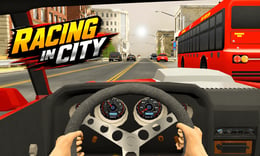


🎮 Racing in City
⭐ Crazy3D Editor's Pick: Racing in City offers an exhilarating urban driving experience where players navigate through busy streets, dodge traffic, and perform thrilling stunts. With endless roads and vehicle upgrades, every drive presents new challenges and opportunities to improve your skills. It launches in the browser with no installation, while the guide below explains the actual objective and controls before your first serious attempt.
🔎 What Is Racing in City?
In Racing in City, players take on the role of a driver navigating through crowded urban environments instead of traditional racing tracks. The goal is to earn high scores by avoiding collisions, overtaking other vehicles, and upgrading cars. Each run presents unique traffic situations, making every trip a test of skill and reaction time as players strive to conquer the busy city roads.
Players control their vehicles using the WASD or Arrow keys to drive and drift through traffic. The game rewards skillful driving with points for close overtakes and longer distances. Players can activate slow motion mode with the Shift key to navigate tricky situations. Collecting rewards and unlocking new vehicles enhances the driving experience, while balancing speed and control becomes crucial as traffic density increases.
This guide describes the hosted version of Racing in City on 1Games. Menus and content may vary in other builds or platforms, so refer to the specific version you are playing for accurate details.
🕹️ Core Gameplay: What You Do in Each Round
- Start your run by selecting a vehicle and hitting the road, ready to face unpredictable traffic.
- Navigate through crowded streets, making quick decisions to avoid collisions and earn points.
- Perform close overtakes and drive faster to increase your score and unlock rewards.
- Collect rewards during your run to unlock new vehicles and upgrades for better performance.
- Continue improving your skills and explore different urban environments for endless driving challenges.
The first attempt is best used to understand feedback: notice what causes a loss, what creates progress, and which input gives you time for the next decision. Once that loop is clear, improvement becomes much more consistent than simply restarting and pressing faster.
🎯 Controls
| Action | Keyboard, Mouse, or Touch |
|---|---|
| Drive and drift | WASD/Arrow Keys |
| Activate slow motion mode | Shift Key |
| On-screen control | Additional controls may be shown in-game. |
If the title screen shows a different key, follow the in-game prompt. This is especially important for browser ports and local multiplayer games, where the host may package a newer or simplified build.
🏆 Game Modes and Progression
- Endless driving mode allows players to continuously navigate through city streets, providing ongoing challenges and score opportunities.
- Vehicle upgrade progression enables players to enhance their cars, improving performance and handling for tougher traffic situations.
- Score-based challenges encourage players to push their limits, rewarding skillful driving and risky maneuvers with higher points.
Not every mode needs the same strategy. Use practice or solo play to learn a mechanic, then move to competitive or progression modes once the basic inputs no longer require conscious thought.
✨ Key Features
🔹 Traffic-based challenges
Experience unpredictable driving scenarios as you navigate through busy streets filled with various vehicles, enhancing the thrill of the game.
🔹 Endless roads
Enjoy continuous driving opportunities with no set finish line, allowing for an immersive and dynamic racing experience.
🔹 Vehicle upgrades
Progress through the game by unlocking and upgrading cars, each offering unique performance characteristics that affect gameplay.
🔹 Realistic city environments
Drive through diverse urban settings that simulate real traffic situations, adding depth and challenge to the racing experience.
🧠 Strategy Guide: How to Improve
- Choose safer lanes to avoid heavy traffic and ensure smoother driving paths, especially in crowded areas.
- Drive faster and pass nearby cars to maximize your score, taking calculated risks for greater rewards.
- Upgrade your cars regularly to improve performance, allowing for better handling and longer driving distances.
- Practice close overtakes to earn bonus points, but be cautious to avoid collisions that could end your run.
- Explore different city environments to experience various traffic patterns and enhance your driving skills.
Good play usually comes from leaving yourself a second option. Whether that means an escape route, enough energy, a defensive card, a safe lane, or one unused ability depends on the game—but spending every resource on the first opportunity is rarely the strongest choice.
📱 Playing on Desktop and Mobile
Racing in City is designed for both desktop and mobile play, utilizing simple controls that make it accessible on various devices. The game can be played in fullscreen mode for an immersive experience, enhancing the thrill of urban racing.
Touch support depends on the embedded build. If no virtual controls appear after the game loads, use a desktop browser and keyboard.
❓ Frequently Asked Questions
What is Racing in City?
Racing in City is an arcade driving game where players navigate through busy streets, dodging traffic and performing stunts to earn high scores and unlock new vehicles.
How do I control my car?
You can control your car using the WASD or Arrow keys for driving and drifting, while the Shift key activates slow motion mode for tricky maneuvers.
Can I upgrade my vehicles?
Yes, players can collect rewards and unlock new vehicles, as well as upgrade their cars to improve performance and handle more challenging traffic situations.


