

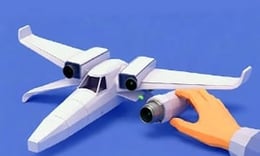


🎮 Aviassembly
⭐ Crazy3D Editor's Pick: Aviassembly allows players to design and build their own aircraft, balancing aesthetics with functionality. With a vast open world to explore, players can engage in missions or unleash their creativity in a limitless environment. It launches in the browser with no installation, while the guide below explains the actual objective and controls before your first serious attempt.
🔎 What Is Aviassembly?
In Aviassembly, players take on the role of aircraft designers in a 3D simulator. The goal is to create functional aircraft capable of navigating a diverse archipelago filled with airfields and hidden secrets. Players can choose between career mode, where they manage resources and complete missions, or creative mode, which offers unlimited resources for experimentation.
Players design airplanes, seaplanes, and land vehicles by selecting parts that influence flight physics and performance. In career mode, they must manage resources and complete missions to earn money and unlock technologies. Creative mode allows for unrestricted building, where players can test their designs in a free environment. Each aircraft behaves differently, requiring careful testing and adjustments before undertaking significant missions.
This guide describes the hosted Miniplay browser build of Aviassembly. Menus and content may differ in other versions of the game.
🕹️ Core Gameplay: What You Do in Each Round
- Choose parts for your aircraft, considering how each affects flight physics and performance.
- Design and customize your aircraft with unique paints and decals to make it visually appealing.
- Test your aircraft on short flights to ensure stability and performance before longer missions.
- Complete missions in career mode to earn money and unlock advanced technologies.
- Experiment freely in creative mode, building without restrictions and exploring the open world.
The first attempt is best used to understand feedback: notice what causes a loss, what creates progress, and which input gives you time for the next decision. Once that loop is clear, improvement becomes much more consistent than simply restarting and pressing faster.
🎯 Controls
| Action | Keyboard, Mouse, or Touch |
|---|---|
| action | On-screen control |
| action | On-screen control |
| action | On-screen control |
If the title screen shows a different key, follow the in-game prompt. This is especially important for browser ports and local multiplayer games, where the host may package a newer or simplified build.
🏆 Game Modes and Progression
- Career mode requires players to manage resources and complete missions, such as transporting cargo or firefighting, to progress and unlock new technologies.
- Creative mode offers players infinite resources, allowing them to experiment with aircraft designs without financial or material constraints.
- Players can explore a vast archipelago filled with airfields, hidden locations, and breathtaking landscapes, enhancing the gameplay experience.
Not every mode needs the same strategy. Use practice or solo play to learn a mechanic, then move to competitive or progression modes once the basic inputs no longer require conscious thought.
✨ Key Features
🔹 Realistic physics
Every part chosen for your aircraft impacts its flight capabilities, making design decisions crucial for success in the game.
🔹 Resource management
In career mode, players must manage resources effectively to complete missions and upgrade their fleet.
🔹 Customization options
Players can paint their aircraft and apply decals, allowing for unique designs that stand out in the sky.
🔹 Technology tree
Upgrade engines, tanks, and modules using a state-of-the-art technology tree to enhance aircraft performance.
🧠 Strategy Guide: How to Improve
- Start with simple and stable designs to ensure successful flights before attempting more complex aircraft.
- Always monitor fuel levels during missions to avoid running out of range, especially over the ocean.
- Test your aircraft on short flights to identify any design flaws before embarking on longer journeys.
- Use light aircraft for exploration and reserve larger planes for heavy transport missions to optimize efficiency.
- Practice takeoff and landing techniques to ensure safe landings on challenging runways.
Good play usually comes from leaving yourself a second option. Whether that means an escape route, enough energy, a defensive card, a safe lane, or one unused ability depends on the game—but spending every resource on the first opportunity is rarely the strongest choice.
📱 Playing on Desktop and Mobile
Aviassembly is playable on both desktop and mobile devices, with controls adapted for touch or mouse input. The game can be played in fullscreen mode for an immersive experience.
Touch support depends on the embedded build. If no virtual controls appear after the game loads, use a desktop browser and keyboard.
❓ Frequently Asked Questions
What types of vehicles can I design?
Players can design airplanes, seaplanes, and land vehicles, each with unique characteristics and uses.
Is there a limit to how I can build in creative mode?
No, creative mode offers infinite resources, allowing players to experiment freely without restrictions.
How does the physics system work in the game?
The physics system is influenced by the parts chosen for your aircraft, affecting flight performance, range, and payload capacity.


