

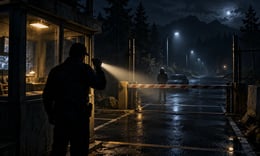


🎮 Security House
⭐ Crazy3D Editor's Pick: Security House turns a night shift into a simple but tense judgment task: you are the guard, and entry should go only to people whose names appear on the list. It stands apart from a standard chase horror by asking you to observe, check, and decide while the dark surroundings keep the pressure on.
🔎 What Is Security House?
Security House is a first-person horror and zombie-themed game by DarkPlay, presented on Playgama. You work as a guard during a night shift. Your central responsibility is to check the visitor against a name list and decide whether that person should be allowed through the entrance. The game's tension comes from having to pay attention instead of treating every encounter as an automatic yes or no.
The atmosphere is built around a dark outdoor setting, a guarded entrance, nighttime visibility, and flashlight use. The official listing describes carefully designed sounds as part of the uneasy mood. Its core rule is easy to understand, but the player still needs to stay alert: a short interaction can matter more than wandering around looking for a weapon or a complicated puzzle system.
The Crazy3D embed uses the Playgama-hosted version. The listing provides PC controls and says mobile controls are supported, but the exact presentation can depend on the embedded build. Follow its on-screen prompts if they differ from this guide.
🕹️ Core Gameplay: Check, Decide, Stay Alert
- Begin a shift and orient yourself around the entrance and the available view of the surroundings.
- When a visitor appears, check the name list before making an entry decision.
- Compare the visitor with the listed names carefully; the central rule is to admit only people whose names are on the list.
- Use the flashlight when you need to manage visibility, and keep control of your view so you can inspect what is happening.
- Continue handling visitors and use the pause control whenever you need a moment to re-check the situation.
The game emphasizes observation and judgment. It is better to verify the information in front of you than to click through encounters quickly. The page does not detail a score formula or every consequence, so use the actual prompts and reactions in the game to learn its rules.
🎯 Controls
| Action | Keyboard / Mouse |
|---|---|
| Move | W A S D |
| Look around | Mouse |
| Use / interact | E |
| Toggle flashlight | Q |
| Pause | Esc |
Playgama also lists mobile support. If you are on a phone or tablet, use the touch controls shown by the game rather than assuming the keyboard mapping applies.
🏆 Shift-Based Decisions
Security House is presented as a guard simulation with horror atmosphere. The primary activity described by the publisher is deciding who may enter based on the name list. It is not advertised as a multiplayer mode or a level-based combat campaign. The flashlight and first-person movement support the night-watch setting, while visitor checks supply the repeated decision loop.
Because the public description does not list every visitor type or scoring rule, this guide avoids promising specific penalties or unlocks. Learn those details from the live build's instructions and feedback.
✨ What Makes It Stand Out
🔹 You are the checkpoint, not the person escaping
Many horror games ask you to flee a monster. Here, the premise makes you responsible for screening entry. That change of role creates tension through attention and decisions.
🔹 One clear rule drives each encounter
The name list gives players a concrete thing to consult: admit only those whose names are present. The challenge is to apply that rule consistently as the night continues.
🔹 First-person night-shift atmosphere
The dark surroundings, windowed guard post, flashlight, and sound-focused mood all reinforce the feeling of being on duty after dark.
🔹 A flashlight is part of the control loop
The Q key toggles the flashlight on PC. It is a practical tool for visibility, not a substitute for checking the list and following the game's prompts.
🔹 Keyboard and mobile support
The Playgama listing names PC and Android platforms. Desktop players have keyboard and mouse controls, while mobile players can use the touch interface presented in the hosted build.
🧠 Tips for Your First Shift
- Check the list every time. Do not rely on memory if the game presents the names for reference.
- Separate looking from deciding. First orient your view and read the available information; then interact.
- Learn the interaction key early.
Eis the listed use control, so try it when the interface indicates an interaction. - Use the flashlight deliberately. Toggle it when visibility is poor, then return to the name check instead of leaving it as your only focus.
- Pause when uncertain.
Escis listed as pause; use it to reset your attention if the situation becomes confusing.
💻 Device and Browser Notes
The listed platforms are PC and Android. Desktop play is best with a keyboard and mouse because the view and movement use separate controls. Mobile is supported according to the listing, but the touch layout can differ by screen size. No download is required to open the Crazy3D browser embed; allow the game to finish loading before judging the controls.
❓ Frequently Asked Questions
What is the main goal in Security House?
You play a night guard and should let in only visitors whose names appear on the list.
How do I toggle the flashlight?
On PC, press Q. Use the hosted version's touch prompt on mobile.
Is this a multiplayer game?
The current listing presents it as a single-player guard experience; it does not advertise multiplayer play.
🔗 More Games on Crazy3D
- For a maze-like horror escape, try Backrooms.
- For a school-based stealth challenge, play Horror Nun 2.
- Browse Granny, the Horror Games collection, New Games, or the Crazy3D collection.
▶️ Play Security House on Crazy3D
Open Security House on Crazy3D and take your place on the night shift.


